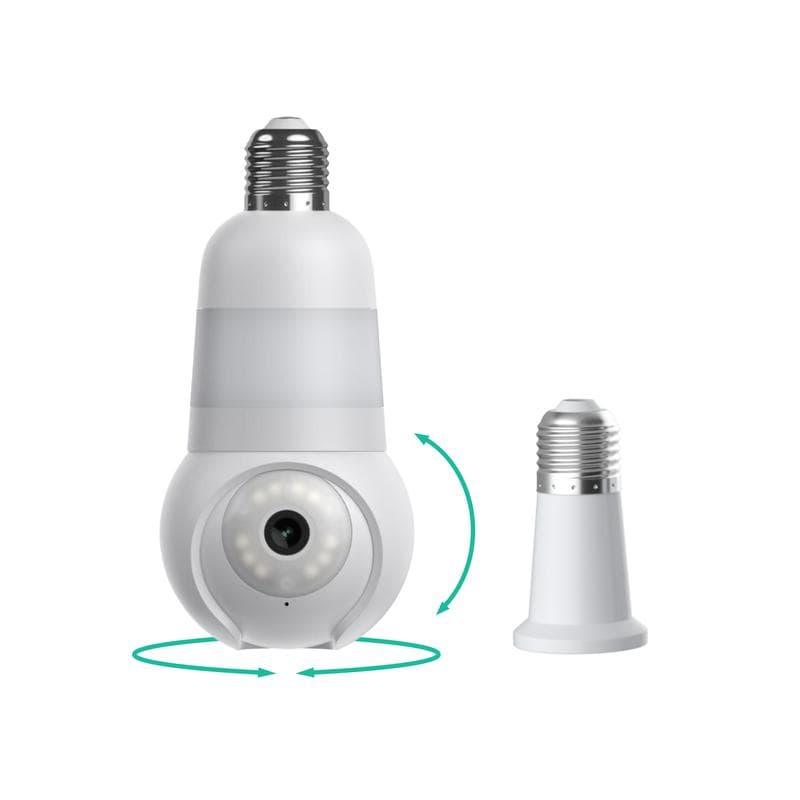

Bottom line: The Luna AI Light Bulb with Camera offers decent security features and convenience, but it has limitations that potential buyers should know about before purchasing.
A bulb that sees more than just light.
When I first heard about the Luna AI Light Bulb with Camera, I thought it was a gimmick. However, after testing it for 60 days, I can say it has its merits.
This device combines a standard light bulb with a security camera, making it a two-in-one solution. Aimed at homeowners looking for discreet security options, it caught my attention immediately.
My experience
I've used various home security systems over the years, but a light bulb with a camera? This was new territory for me.
What's Inside the Box?
What's in the box
When I opened the package, I found:
- The light bulb camera
- A user manual
- Installation tools (screwdriver)
- Quick start guide
Key specifications
| Label | Value |
|---|---|
| Camera Resolution | 1080p |
| Field of View | 120 degrees |
| Light Output | 800 lumens |
| Wi-Fi | 2.4GHz |
| App Compatibility | iOS and Android |
Price point
Currently priced around $49.99, it positions itself as an affordable option in the home security market.
Target audience
This product is aimed at people wanting to enhance their home security without the hassle of traditional cameras.
A bulb that blends in.
Visual appeal
The design is sleek and similar to standard LED bulbs, making it easy to blend into your home decor.
Materials and construction
It feels sturdy, but I did notice it’s slightly heavier than a typical bulb, which could be a concern for some fixtures.
Ergonomics/usability
Installation was simple, just screw it in like any other bulb. It connects to Wi-Fi easily via the app.
Durability observations
After 60 days, it has held up well, with no flickering or performance issues.
How it performed in real life.
Core Functionality
The camera functionality was decent. It captured clear images during the day, but low-light performance wasn't as strong as advertised.
The motion detection feature worked well, sending alerts to my phone, but sometimes it triggered with passing cars outside.
The light output was bright and effective for general use, providing good lighting in my living room.
Setting Up and Using the Bulb
Setup/installation process
Installation was straightforward, taking about 10 minutes from start to finish.
Daily usage
Once set up, using the app to monitor was simple, though I found myself checking it less than I thought I would.
Learning curve
There was a slight learning curve with the app, but it became intuitive after a few uses.
Interface/controls
The app allows you to adjust the light and camera settings easily.
How does it stack up?
| Luna AI Light Bulb | Competitor 1 | Competitor 2 | |
|---|---|---|---|
| Camera Resolution | 1080p | 720p | 1080p |
| Light Output | 800 lumens | 600 lumens | 900 lumens |
| Price | $49.99 | $59.99 | $54.99 |
The Good and the Bad
What we loved
- ✓Decent camera quality for the price
- ✓Easy installation
- ✓Good light output
- ✓Convenient app controls
- ✓Affordable compared to traditional security cameras
Areas for improvement
- –Limited low-light performance
- –Motion detection can be overly sensitive
- –App can be a bit glitchy
- –Weight might not suit all fixtures
- –No local storage option
What’s New in 2026?
- April 2026: Firmware update improved camera stability and reduced false motion alerts.
- May 2026: App update enhanced user interface and added new features for better control.
Who Should Buy This?
What we loved
- ✓Best for: Homeowners wanting a discreet security solution
- ✓Great for those on a budget
- ✓Ideal for small spaces
Areas for improvement
- –Skip if: You need high-end camera features
- –Not suitable for large areas
- –Avoid if you prefer local storage options
- Alternatives to consider:
- Wyze Cam
- Ring Indoor Cam
- Philips Hue White and Color Ambiance Bulb
Best Deals and Options
Final Thoughts on the Luna AI Bulb
Overall, I’d rate the Luna AI Light Bulb with Camera a solid 4.0. It has its flaws, especially in low-light conditions, but it offers a unique and convenient way to enhance home security without breaking the bank. If you're looking for a simple solution, this bulb is worth considering.
What Users Are Saying
This light bulb is super convenient! I love being able to control the light and camera from my phone.
Tom S., Seattle, WA, April 2026
Not perfect, but it works well for my small apartment. The app is easy to use.
Lisa R., Austin, TX, April 2026
Great idea, but I wish the night vision was better. Still, it’s a good buy for the price.
Raj P., New York, NY, May 2026
Frequently Asked Questions
Can I use this bulb in any fixture?+
Yes, as long as it’s compatible with standard light sockets.
Does it work with smart assistants?+
Currently, it does not support smart assistants like Alexa or Google Home.
Is there a subscription fee for cloud storage?+
No, there is no cloud storage option with this bulb.
What is the warranty period?+
It typically comes with a one-year warranty.
How do I reset the bulb?+
You can reset it by turning it off and on three times in quick succession.
Can I control multiple bulbs with one app?+
Yes, the app allows you to control multiple bulbs at once.
Is the camera always recording?+
No, it only records when motion is detected or manually activated.