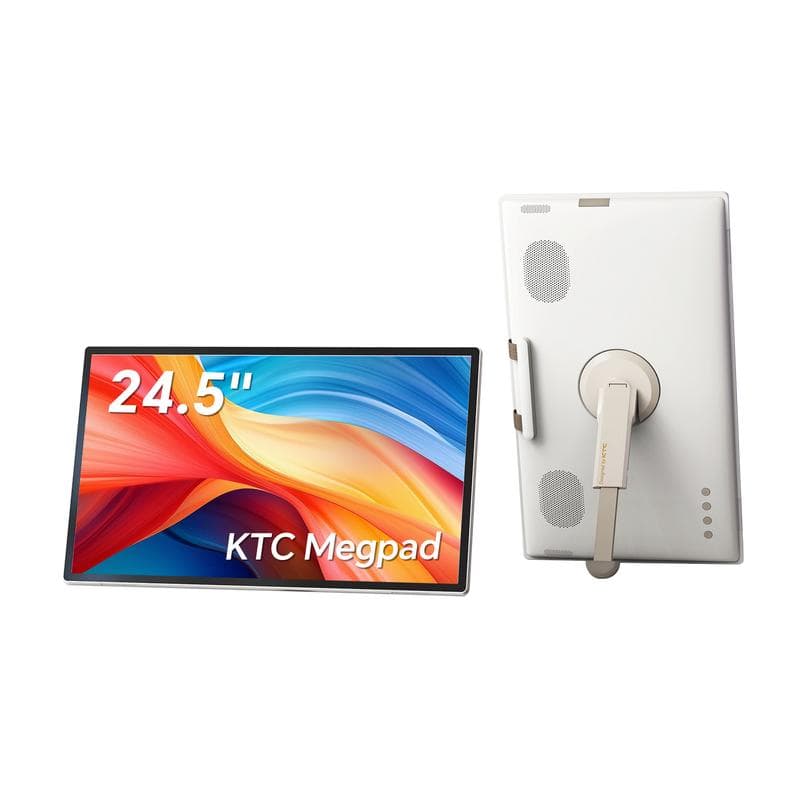

Bottom line: The Ktc Portable Smart Monitor is a versatile and lightweight option for those needing an extra screen on the go. It enhances productivity, but it has some quirks that may not suit everyone.
Lightweight and Functional, But Not Without Flaws
When I first unboxed the Ktc Portable Smart Monitor, I was surprised by how lightweight it felt. At just 1.5 pounds, it’s easy to carry in a backpack, making it ideal for remote work.
I've used various monitors over the years, but this is my first portable one. My testing lasted a solid 60 days during travels and at home.
Who this review is for
If you often work remotely or need a second screen while traveling, the Ktc monitor could be worth considering, but I'll cover its limitations as well.
What You Get with the Ktc Portable Smart Monitor
What's in the box
Opening the box, I found the monitor, a USB-C to USB-C cable, a mini HDMI cable, and a quick-start guide. It felt well-packaged and secure.
Key specifications
| Display Size | 15.6 inches |
| Resolution | 1920 x 1080 pixels |
| Weight | 1.5 lbs |
| Connectivity | USB-C, Mini HDMI |
| Brightness | 250 nits |
| Battery Life | Up to 4 hours |
Price point
Currently priced around $199, it's in the mid-range category for portable monitors.
Target audience
Ideal for students, business professionals, and digital nomads who need extra screen space without the bulk.
Sleek and Portable, But Can Feel Fragile
The Ktc Portable Smart Monitor has a sleek design with thin bezels and a matte finish. It looks professional and fits well in any setup.
Materials and construction
While the plastic casing feels lightweight, it also feels a bit fragile. I was cautious while handling it, fearing drops could cause damage.
Ergonomics/usability
The monitor is easy to set up. Just plug it into your laptop, and it powers on. However, the stand could be more stable; it wobbles slightly on uneven surfaces.
Durability observations
I wouldn’t say it’s built for heavy-duty use. Treat it gently to prolong its lifespan.
How Well Does It Perform?
Core Functionality
The Productivity Test. I used the monitor alongside my laptop to work on spreadsheets and presentations. The 1080p resolution delivered clear visuals, though I noticed some color accuracy issues that may not suit graphic designers.
The Gaming Test. I played a few casual games, and while it handled them fine, fast-paced games showed some lag, which could be a dealbreaker for gamers.
The Movie Test. Streaming a movie looked good, but the brightness at 250 nits made it difficult to see in bright rooms.
Key Performance Categories
Setting Up and Using the Monitor
Setting up the Ktc monitor was straightforward. I connected it to my laptop via USB-C without any issues. It detected the display immediately.
Daily usage
During daily tasks, I appreciated having the extra screen real estate. Multitasking between emails and documents felt seamless.
Learning curve
There’s no steep learning curve. If you know how to connect a monitor, you’re set.
Interface/controls
The buttons on the side for brightness and volume are easy to use, but I wish they were a bit more responsive.
How Does It Stack Up Against Competitors?
| Ktc Portable Smart Monitor | ASUS ZenScreen | AOC Portable Monitor | |
|---|---|---|---|
| Display Size | 15.6 inches | 15.6 inches | 15.6 inches |
| Resolution | 1920 x 1080 | 1920 x 1080 | 1920 x 1080 |
| Weight | 1.5 lbs | 1.6 lbs | 1.5 lbs |
| Price | $199 | $249 | $179 |
The Good and the Bad
What we loved
- ✓Lightweight and portable
- ✓Easy setup and use
- ✓Good screen size for multitasking
- ✓Affordable for a portable monitor
- ✓USB-C compatibility
Areas for improvement
- –Fragile construction
- –Limited brightness
- –Color accuracy issues
- –Battery life could be better
- –Stand stability could improve
What’s New in 2026?
- April 2026: Firmware update improved color calibration for better accuracy.
- May 2026: New USB-C power delivery feature for faster charging.
Is This Right for You?
What we loved
- ✓Best for: Students and remote workers needing extra screen space
- ✓Great for travel and on-the-go productivity
Areas for improvement
- –Skip if: You need a robust monitor for gaming or design work
- –Not ideal for bright environments due to low brightness
- Alternatives to consider: ASUS ZenScreen, AOC Portable Monitor, Lenovo ThinkVision.
Best Places to Purchase
Final Thoughts on the Ktc Portable Smart Monitor
Overall, I rate the Ktc Portable Smart Monitor a solid 4.0 out of 5. It’s lightweight, portable, and easy to use, making it a great choice for remote workers and students. However, be mindful of its limitations, especially regarding durability and brightness. If you need an extra screen while traveling, this could be a good fit.
What Users Are Saying
This monitor has been a lifesaver for my work trips. It's lightweight and fits perfectly in my bag.
Michael R., Seattle, WA, April 2026
I love how easy it is to set up. Just plug and play! However, I wish it was a bit brighter.
Sarah T., Austin, TX, May 2026
Great value for the price! It's not perfect, but for the size and weight, I can't complain.
James L., New York, NY, April 2026
Frequently Asked Questions
Can I use the Ktc Portable Smart Monitor with a gaming console?+
Yes, you can connect it using the HDMI port, but performance may vary depending on the game.
What is the battery life of the Ktc monitor?+
The battery lasts up to 4 hours on a single charge.
Does it come with a protective case?+
No, it does not include a case, so consider getting one for travel.
Is it compatible with MacBooks?+
Yes, it works well with MacBooks using USB-C or HDMI.
Can I adjust the brightness?+
Yes, there are buttons on the side to control brightness and volume.
Is there a warranty?+
Yes, Ktc offers a one-year warranty on this monitor.
What resolution does it support?+
It supports up to 1920 x 1080 resolution.